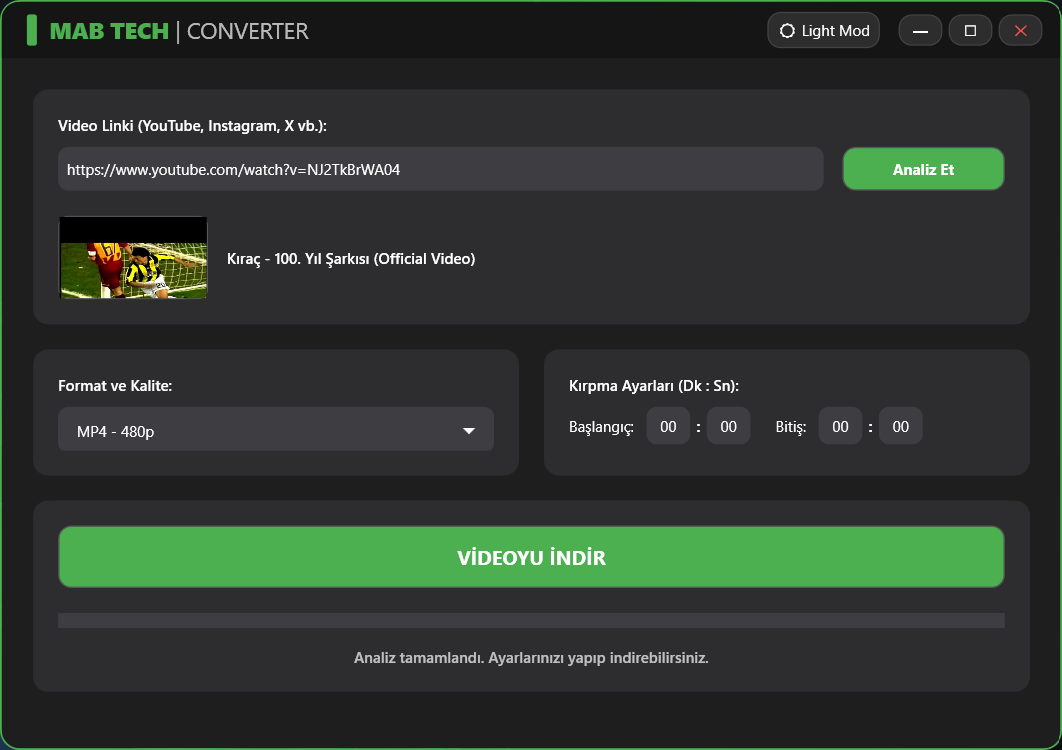
MAB Converter
MAB Converter, YouTube, LinkedIn, Instagram, X (Twitter) ve daha birçok platformdan yüksek kaliteli (4K/1080p) video ve ses indirmeyi, kırpmayı ve dönüştürmeyi sağlayan profesyonel bir Windows masaüstü uygulamasıdır.
Teknolojiler
Proje Dokümantasyonu
🚀 MAB Converter | Ultimate Media Downloader & Converter




🇹🇷 Türkçe (Turkish)
MAB Converter, YouTube, LinkedIn, Instagram, X (Twitter) ve daha birçok platformdan yüksek kaliteli (4K/1080p) video ve ses indirmeyi, kırpmayı ve dönüştürmeyi sağlayan profesyonel bir Windows masaüstü uygulamasıdır.
MAB Tech tarafından geliştirilen bu araç, sıfır kalite kaybı (Remux/Stream Copy) felsefesiyle ve modern "Glassmorphism" (Cam Efekti) UI tasarımıyla öne çıkar.
✨ Öne Çıkan Özellikler
- 🔥 Kayıpsız İndirme (Zero Quality Loss): YouTube'un WebM formatlarını işlerken kaliteyi bozmadan orijinal 4K/1080p MP4 olarak remux eder.
- 🎬 Akıllı Kırpma: İndirme esnasında belirlediğiniz Dakika:Saniye aralığını CRF-18 yüksek kalitede keser.
- 🧠 Akıllı Codec Motoru: LinkedIn veya Instagram gibi platformların desteklenmeyen formatlarını anında standart H.264 MP4'e çevirerek "Siyah Ekran" sorununu kökten çözer.
- 🎨 Modern Glass UI: Işık/Karanlık (Light/Dark) tema desteği ve akıcı animasyonlara sahip yuvarlatılmış cam tasarımı.
- ⚡ Otomatik Bağımlılık Yönetimi: Arka planda çalışan
yt-dlpveffmpegmotorlarını ilk açılışta otomatik olarak günceller ve yapılandırır.
📥 Kurulum & İndirme
Projeyi kaynak kodundan derlemekle uğraşmak istemiyorsanız, doğrudan kurulabilir .exe versiyonunu indirebilirsiniz.
- Releases klasörüne gidin veya GitHub Releases sekmesine tıklayın.
MAB_Converter_Setup_v1.0.exedosyasını indirin.- Kurulumu çalıştırın (Tüm bağımlılıklar ve motorlar otomatik olarak kurulacaktır).
- Masaüstündeki MAB Converter ikonuna tıklayarak keyfini çıkarın!
💻 Geliştiriciler İçin (Kaynak Kodu)
Projeyi kendi bilgisayarınızda geliştirmek istiyorsanız:
- Bu depoyu klonlayın:
git clone https://github.com/Mertcan-BZTPRK/MAB_Converter.git - Visual Studio 2022 ile
MAB_Converter.slndosyasını açın. - Gerekli NuGet paketlerini (YoutubeDLSharp vb.) geri yükleyin (Restore).
- Projeyi derleyip çalıştırın.
🛠️ Kullanılan Teknolojiler
- C# / WPF: Arayüz ve temel programlama mantığı.
- YoutubeDLSharp: Medya analiz ve indirme köprüsü.
- yt-dlp & FFmpeg: Arka plan medya motorları (Gelişmiş komut setleriyle optimize edilmiştir).
- Inno Setup: Kurulum (Setup) paketlemesi.
📝 Lisans
Bu proje MIT Lisansı ile lisanslanmıştır. Daha fazla bilgi için LICENSE dosyasına göz atabilirsiniz.
Geliştirici: Mertcan Boztoprak (MAB Tech)
🇬🇧 English
MAB Converter is a professional Windows desktop application that allows you to download, crop, and convert high-quality (4K/1080p) video and audio from platforms like YouTube, LinkedIn, Instagram, X (Twitter), and more.
Developed by MAB Tech, this tool stands out with its zero quality loss (Remux/Stream Copy) philosophy and modern "Glassmorphism" UI design.
✨ Key Features
- 🔥 Lossless Download (Zero Quality Loss): Remuxes YouTube's WebM formats into original 4K/1080p MP4 without compromising quality.
- 🎬 Smart Cropping: Cuts the specified Minute:Second range in high-quality CRF-18 directly during the download process.
- 🧠 Smart Codec Engine: Instantly converts unsupported formats from platforms like LinkedIn or Instagram to standard H.264 MP4, permanently solving the "Black Screen" issue on Windows.
- 🎨 Modern Glass UI: Rounded glass design with Light/Dark theme support and fluid animations.
- ⚡ Automatic Dependency Management: Automatically updates and configures the background
yt-dlpandffmpegengines on the first launch.
📥 Installation & Download
If you don't want to deal with compiling from source code, you can directly download the installable .exe version.
- Go to the Releases folder or click the GitHub Releases tab.
- Download the
MAB_Converter_Setup_v1.0.exefile. - Run the setup (All dependencies and engines will be installed automatically).
- Click the MAB Converter icon on your desktop and enjoy!
💻 For Developers (Source Code)
If you want to build and develop the project on your own machine:
- Clone this repository:
git clone https://github.com/Mertcan-BZTPRK/MAB_Converter.git - Open the
MAB_Converter.slnfile with Visual Studio 2022. - Restore the required NuGet packages (YoutubeDLSharp, etc.).
- Build and run the project.
🛠️ Technologies Used
- C# / WPF: UI and core programming logic.
- YoutubeDLSharp: Media analysis and download bridge.
- yt-dlp & FFmpeg: Background media engines (optimized with advanced command sets).
- Inno Setup: Setup packaging.
📝 License
This project is licensed under the MIT License. For more information, check out the LICENSE file.
Developer: Mertcan Boztoprak (MAB Tech)